It's a fact of life that using Viber without your real number involves one way or another having to get one, and MoreMins virtual numbers are a simple answer.
Upon opening the Viber application, you are greeted immediately by a request to enter your contact details. It's impossible to move past this screen without it. You are not required to link your personal contact details to it as a digital alternative can be used that still provides all the required functionality and also separates physical hardware from the application.
This guide covers all steps beginning from the very start to end and not skipping any necessary steps in between.
Are you able to use Viber without your phone number?
Yes, this is correct. You can only link a single mobile number with Viber for a single account. In order to activate the account, you either have to receive an SMS message or get an automated phone call to confirm the account is active. You cannot use a private username with the service so your identity will only be determined by your telephone number. Viber requires access to your contact list to identify which of your contacts have registered to use the service and therefore it is required to have this identifier to gain access to the application.
This is where the need for selecting a correct phone number comes into play as using your own number would permanently link it to your private profile, whereas a temporary digital line would completely separate you from this required number.
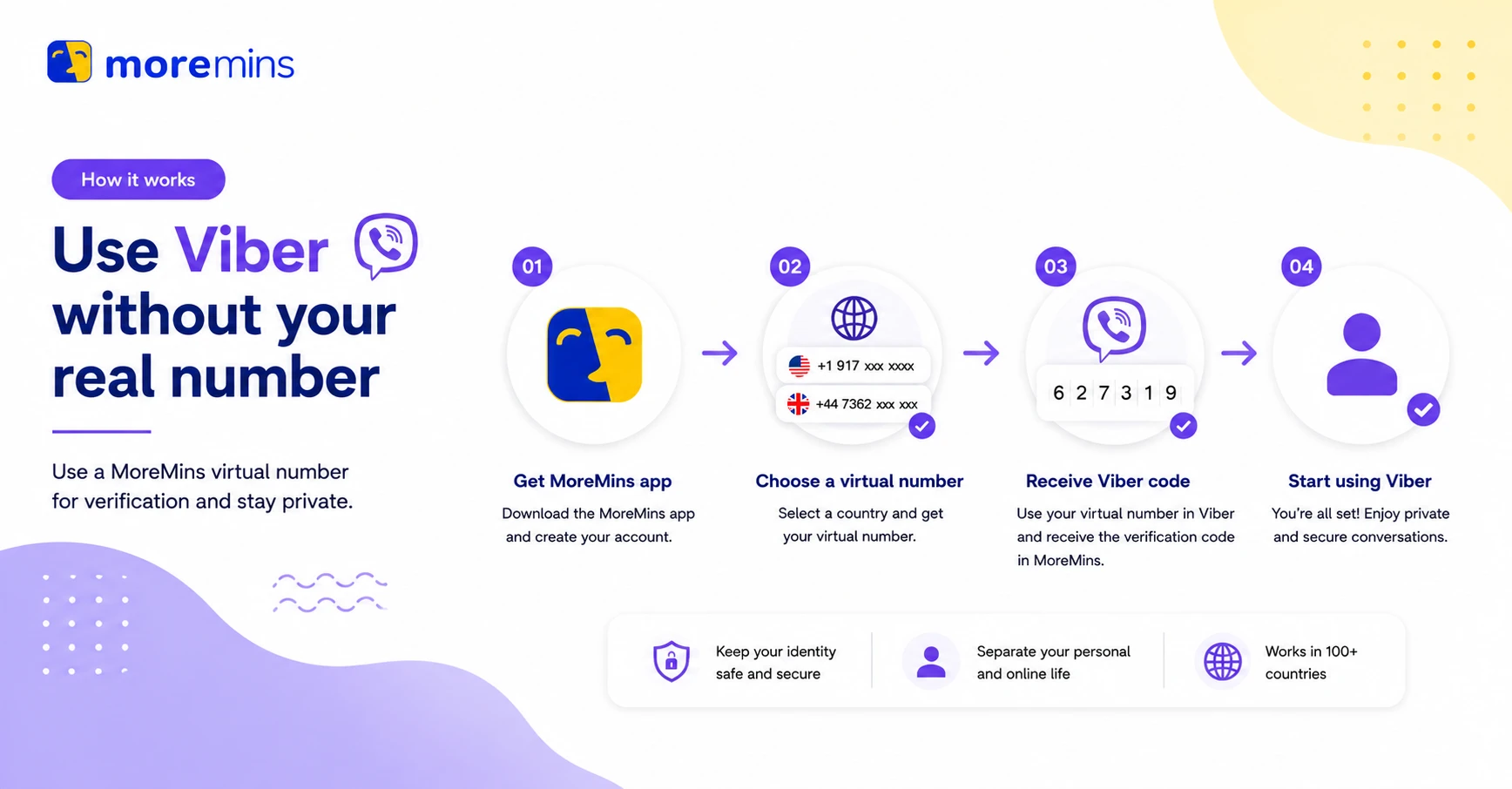
How to register Viber with your MoreMins number
The total amount of time it will take for you to complete all the required steps and get registered on Viber is about five minutes and this will involve you going through two basic stages, procuring a digital number and then activating it.
Get your virtual number
- There are a number of applications you can download from either the App Store or from Google Play. Huawei AppGallery has also provided an application for those that do not have a device with either of these operating systems.
- Open the application and then enter an email to register the application account and secure access.
- Go to the virtual number page and choose a country. If you don't know which one you should pick, start by choosing one of the English speaking countries like the UK or other European countries as these are most likely to confirm accounts correctly on apps.
- Choose a number that you feel best represents you and continue. Scroll through each number presented until one stands out for any reason you can think of. When you see that specific number then proceed to selection.
- Choose your plan, followed by activating your chosen digital number. In this case all that Viber needs from you to activate is the SMS message, but it is not necessary to look for anything else.
- The account is now ready! Get the code to confirm that you received a text message while your account is opened within the MoreMins application rather than checking standard phone folders for the SMS.
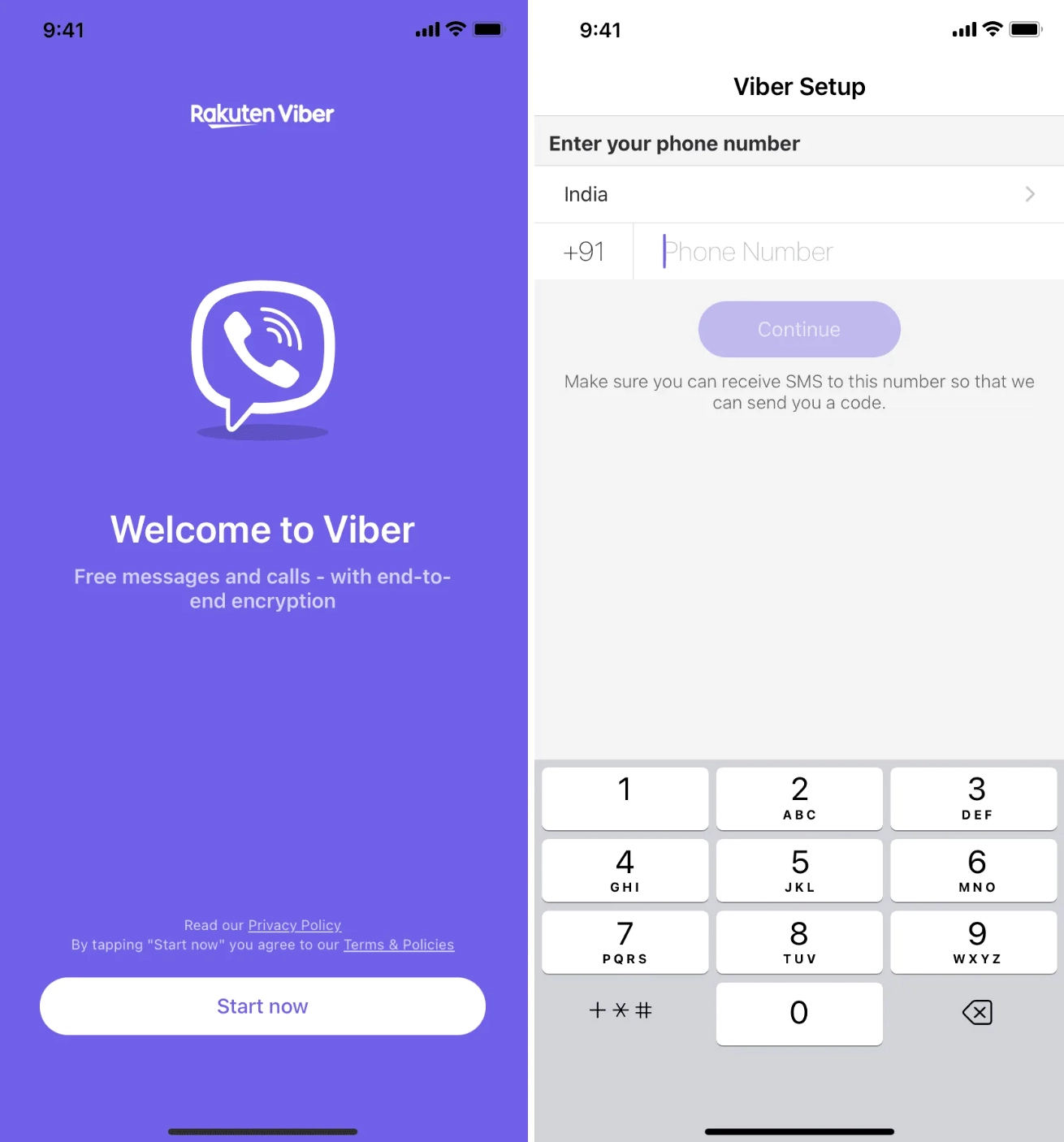
Register Viber with the phone number
- The application appears when it is activated on the cell phone. It's ready to be used.
- Go through the service terms and agree when prompted.
- From the panel, enter your chosen country code and then enter in the digits of the mobile number that you got from MoreMins carefully. The numbers may all look the same so be careful. Review these digits again and press the call button on the panel. A dialog box of some sort appears.
- Retrieve your chosen number from the message box when you receive it, by going to the message folder where your number is assigned, you must receive a verification code from Viber which is sent by text.
- If more than one minute passes and you still haven't received a message from Viber then click on the call button once again as this usually sends a robotic voice that will tell you the number over the phone.
- The text or the voice will provide you with a 6 digit number. The Viber application requires this number. Enter the numbers that you receive from Viber into the field provided and click OK.
- Enter your name and an avatar, which could be a picture of something else completely and the Viber system automatically authenticates your account and you can begin using the application from this point onwards.
Keep your number running
You will need to keep the digital number running by maintaining the paid subscription. If the subscription plan ceases to be valid, then following a short grace period, your assigned number may no longer be assigned to your account, but instead it could be reassigned to someone else if they use that same number to access their account with Viber. If the account you registered is with another application and is not verified again after the granted grace period then it will simply cease to be validated for a period of time. For continued access to the application and your account, you are required to keep the plan active to maintain the unique mobile number linked to the profile.


You don't need anything else; your mobile number is simply registered and linked to the virtual number assigned to you by the application where you have bought and paid for the account. Using this number you can register to many other applications by having the verification text message sent to it; even having the eSIM card set to an English number does not seem to limit the usage.
Viber without a phone number - FAQ
Yes, Viber requires you to use your mobile number to set up your account but you can generate a virtual mobile number to do this rather than using your real one. The number will serve the purpose of confirming your account with either an SMS message or a robotic call and from then onwards is used to identify you with that account.
A cell number is required to create a Viber account due to lack of alternative usernames, which are available for Telegram for example, or privacy-focused accounts which could protect user's personal data but in this situation you have a unique mobile identifier to your private profile which is completely separate from your real contact detail.
Generally, you will have no issues getting the digital number to receive an SMS message, though sometimes the automatic voice call would be the method of contact when delivering the confirmation key as these systems have been known to never fail for that.
For Viber the contact identification is through the number and no username feature exists. To be safe it will always be necessary to set up your Viber account with your virtual number, which will keep your personal number from any visible data.
If you fail to renew your service within a certain period after your original plan runs out, the assigned digital number becomes a free and common number again to all users, so you can lose the assigned number forever if some other individual claims the digital number once it's no longer yours to keep active and registers their own Viber account to it.
Yes, absolutely. If you bought one digital line from us, you may be able to register to other applications using this very digital number as the confirmation for your new account; this application is mainly used to communicate with family and friends and other text messaging platforms will require a mobile number for verification, too.